Workforce Scheduling Software for Complex Operations
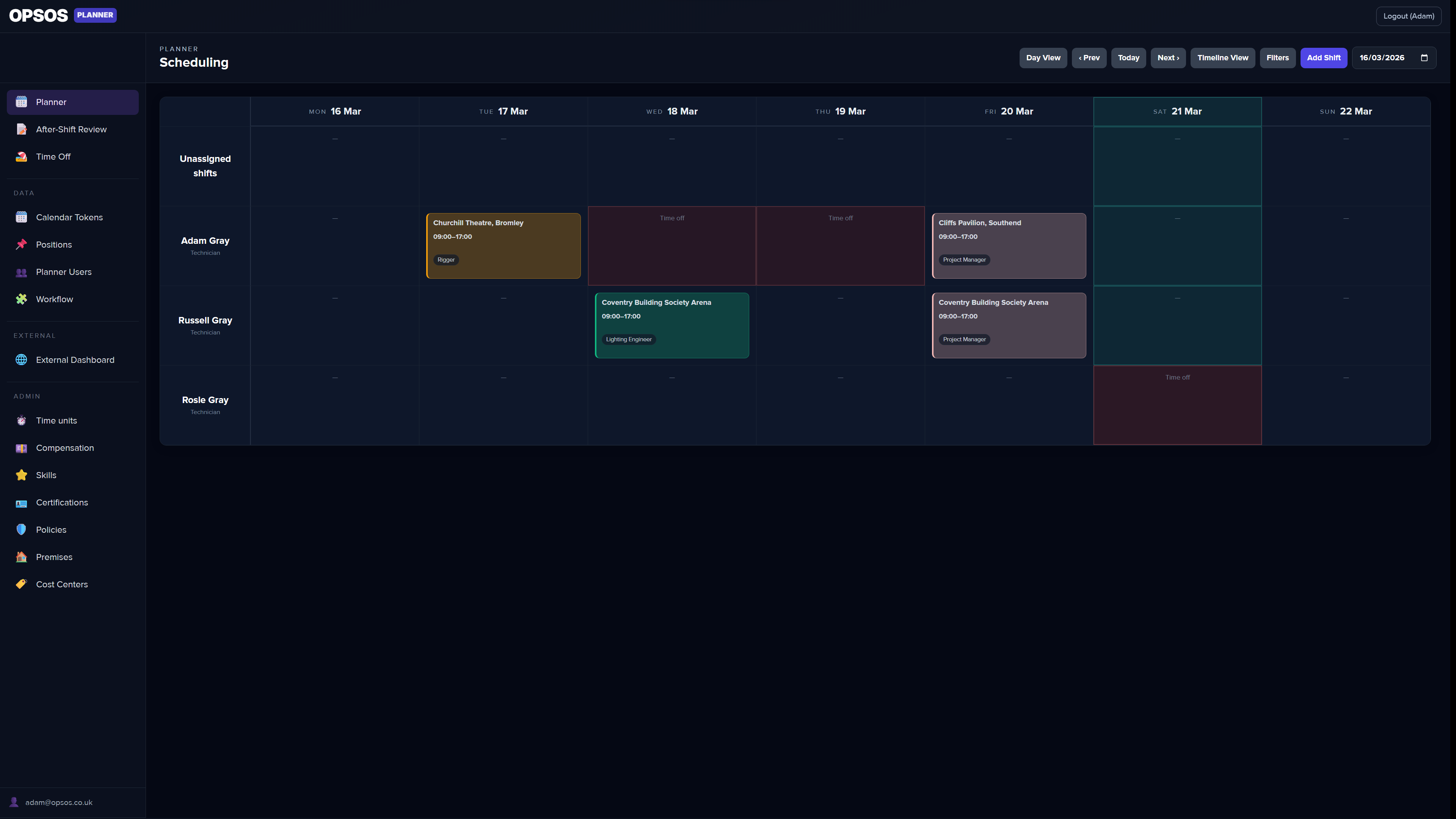
Scheduling shifts across a team with different roles, availability, and contracts is hard to manage in a spreadsheet. OpsOS Planner handles rosters, time-off, and shift management without the chaos.
What's included
Everything in one module — no add-ons, no hidden extras.
Shift scheduling
Rosters built at pace, not at a desk.
Drag-and-drop board for building and editing rosters across your team. Assign workers to shifts, adjust times, and move assignments in seconds. Everything updates in real time across the whole team.
Policy engine
Rules that run themselves.
Define workforce policies and let the planner enforce them automatically. Rules cover rest periods, maximum consecutive days, maximum hours per rolling period, required certifications, role pairing requirements, venue staffing ratios, and worker-to-worker restrictions. Violations are flagged on the board before a shift is confirmed — not after it's too late to fix.
Time-off management
Leave tracked. Nothing double-booked.
Workers request annual leave, sick days, and other absences through the planner. Managers approve or decline from the same view. Approved time-off blocks automatically prevent scheduling conflicts so you never assign someone to a shift they can't work.
Positions
Every role defined. Every shift staffed right.
Define named positions — crew chief, driver, technician, whatever your operation uses — and attach them to shifts. Positions carry pay rate logic so hours and costs calculate automatically. Filter the board by position to see resourcing gaps at a glance.
Contracts
Hours, rates, and terms all in one place.
Store contract types, working hour agreements, and pay rates against each worker. The planner uses contract data to flag when a shift would exceed agreed hours or incur overtime — so you can make conscious decisions rather than costly surprises.
Certifications
Only qualified people in qualified roles.
Attach certification requirements to positions and track which workers hold them. Policy rules can require a valid certification before a worker can be assigned to certain shifts or venues. Expired certifications are surfaced automatically so you're never caught short.
External worker portal
Workers in the loop. Access strictly gated.
Workers get their own external portal account — separate from your main OpsOS — where they can view their upcoming shifts, accept or decline new ones, update their personal details, and submit availability. They see only what's relevant to them. Nothing else.
After-shift forms
End-of-shift reporting, done on the floor.
Configure after-shift forms for workers to complete at the end of each assignment — mileage, hours worked, incident notes, equipment issues, whatever your operation needs. Responses are captured in the worker portal and surfaced to managers for review.
Calendar export
Shifts in every calendar. No excuses.
Export individual or full-team schedules to iCal, Google Calendar, and Outlook. Workers can subscribe to a live calendar feed so their shifts stay current without any manual syncing — changes in OpsOS appear automatically.
Assignment backups
Bulk edit safely. Always roll back.
Before any bulk operation on the roster, OpsOS takes an automatic backup of the current assignments. If something goes wrong or the edit wasn't right, you can restore the previous state without piecing things together manually.
Onboarding
New workers up and running fast.
Structured onboarding flow for new workers joining the planner. Collect personal details, emergency contacts, bank information, and certification uploads in one place. Workers complete it through their external portal — no paper, no chasing.
Availability
Know who's free before you ask.
Workers declare their availability windows directly in their portal. When building rosters, the planner surfaces availability information so you only assign people when they're actually free — cutting down the back-and-forth before a roster is confirmed.
Part of a connected operations platform.
OpsOS Planner doesn't work in isolation. It connects with every other module in your stack — so your inventory, purchasing, scheduling, and HR data all talk to each other automatically. No integrations to maintain. No data to sync manually.
- ✓ Multi-tenant, permission-based access control
- ✓ Enable only the modules your team needs
- ✓ Your data stays yours — no vendor lock-in
- ✓ Built for operations teams, not generic business users
Ready to get off the spreadsheet?
OpsOS is launching soon. Join the waitlist and we'll be in touch.